Creating a desk setup that promotes both focus and comfort can transform the way you work. Whether you spend several hours working from home or need an organized space in the office, a thoughtfully arranged desk can help reduce distractions, improve posture, and increase productivity. In this post, we’ll explore practical tips to help you design a workspace that supports your best work habits and keeps you comfortable throughout the day.
Why a Good Desk Setup Matters
Before diving into the tips, it’s important to understand why your desk setup impacts your work so much. A cluttered or uncomfortable workspace can cause physical strain, reduce concentration, and make tasks feel more difficult. On the other hand, a well-organized and ergonomic desk improves efficiency, reduces fatigue, and helps maintain your focus.
Choosing the Right Desk and Chair
Desk Height and Surface Area
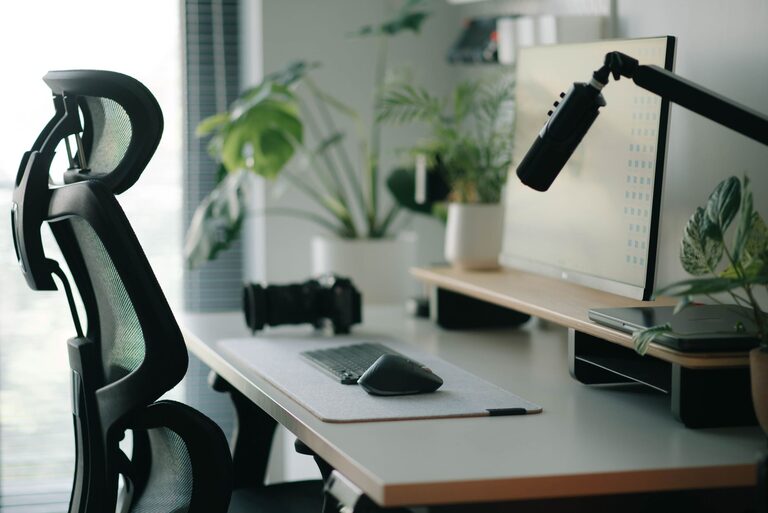
Select a desk with enough surface area to hold your essentials without crowding your workspace. You want room for your computer, a notebook, perhaps a lamp, and a few personal items. The height of the desk should allow your forearms to rest comfortably at about a 90-degree angle when typing.
Ergonomic Chair
Invest in an ergonomic chair that supports the natural curve of your spine. Adjustable height, lumbar support, and comfortable padding are key features. Your feet should be flat on the floor or on a footrest, and your knees at about a 90-degree angle.
Optimize Monitor Placement
Your monitor’s position greatly affects your neck and eye comfort.
– Place the monitor directly in front of you.
– The top of the screen should be at or just below eye level.
– Position the screen about an arm’s length away.
– Reduce glare by adjusting screen brightness and positioning relative to windows.
Lighting for Comfort and Focus
Natural light is ideal, but not always possible.
– Position your desk near a window if you can, to take advantage of natural light.
– Use a desk lamp with adjustable brightness and direction to reduce eye strain.
– Avoid harsh overhead lighting or reflections on your screen.
Declutter and Organize
A clean desk helps keep your mind clear.
– Use organizers or trays to store pens, papers, and accessories.
– Limit personal items to a few meaningful objects to avoid distractions.
– Regularly tidy your desk to prevent buildup of unnecessary items.
Enhance Comfort with Accessories
Certain accessories can improve comfort and reduce physical strain.
– Keyboard and Mouse: Choose ergonomic designs and keep them close enough to avoid overreaching.
– Wrist Rest: A soft wrist rest can support your hands while typing.
– Footrest: If your feet don’t reach the floor comfortably, use a footrest.
– Desk Mat or Pad: Adds a smooth surface and can reduce wrist strain.
Incorporate Movement and Breaks
Even the best desk setup can’t prevent fatigue if you stay in one position too long.
– Stand up and stretch every 30-60 minutes.
– Consider using a sit-stand desk or desk converter.
– Use reminders or apps to prompt regular breaks.
Personalize Mindfully
Adding personal touches can make your workspace inviting.
– Plants add a touch of nature and may improve air quality.
– Inspirational quotes or artwork can motivate you.
– Choose colors and decor that make you feel calm and focused.
Cable Management
Tangled cables can be distracting and make your desk look messy.
– Use cable clips or ties to organize cords.
– Consider wireless peripherals to reduce clutter.
– Position power strips under the desk for a cleaner look.
Final Thoughts
Designing a desk setup that fosters focus and comfort is a combination of choosing the right furniture, arranging your tools thoughtfully, and maintaining an organized space. Small adjustments can make a big difference in your daily work experience. Take some time to assess your current setup and try these tips to create a workspace that helps you work smarter and feel better.